
How We Built and Maintain Our ISO 27001 ISMS Documentation
Discover how we, the Oxygen XML team, built and streamlined our ISO 27001 ISMS documentation using the power of DITA, Git, Content Fusion, custom validation, and workflow automation, creating a more structured, consistent, and efficient approach to managing information security documentation.
At Syncro Soft, the company behind the Oxygen XML products, we became ISO 27001 certified in 2024. The certificate is the visible part. Behind it is an information security management system (ISMS): a practical way to define, run, review, and improve how we protect the business. An ISMS is only as good as its documentation, and policies that sit in a folder until the next audit do not protect anything. It had to be easy to update, remind us when a review or procedure was due, let us initiate and track procedure runs, and keep a record of every change.
As a company that builds documentation tools, we did what came naturally: we treated it as a documentation project. Here is how we approached it.
Why ISO 27001
Security protects the assets at the heart of a business. Cyberattacks are increasing, including attacks assisted by AI. Companies are responding not only by protecting their own systems, but also by checking that their providers are secure. This helps reduce supply-chain risk.
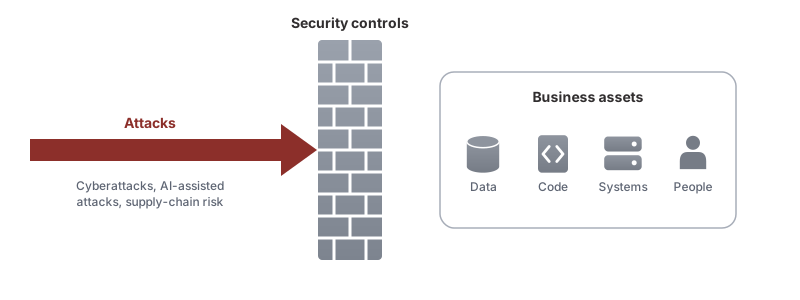
Before we started certification, we already had many security controls in place. We wanted a certified system that would keep us focused on security and on improving those controls. That is why we chose ISO 27001.
We worked with a consultant to structure the policies before the official certification audit. You can also start with a policy kit: general policy stubs that you adapt to reflect your controls and organizational structure. The resulting policies feed into a Statement of Applicability: the document that records which ISO 27001 controls apply to your organization, and why. You can share it with customers.
For each policy, we collected as much information as we could from our colleagues and used AI to merge it into the policy stubs. Then we reviewed the result to make sure it was accurate and that nothing important had been lost.
Starting from our internal wiki
Before certification, all our procedures already lived on our internal wiki. Because we develop Oxygen XML Editor, we were already familiar with structured technical documentation. We chose DITA, an XML-based standard that stores content as small, reusable topics. It supports custom metadata, content reuse, validation, and publishing to multiple formats from the same source, which is exactly what governance documentation needs. It also helped that we already had the tools to author, review, and publish it.
Our existing DITA wiki was stored in a shared Git repository, which gave us access control and a complete change history. We added a new ISMS chapter to its DITA map—the table of contents that organizes the topics—and created a topic for each piece of relevant information.
What a good ISMS needs
- Change history
- A form of access control
- An accountable owner and clearly assigned responsibilities; for procedures, we used RACI sections (Responsible, Accountable, Consulted, and Informed)
- A way to start and track standard operating procedures (SOPs) in our internal issue tracker
- A review timeline: each document needs a review date and review period
- A way to collaborate on and review documents
- A form to mark the documents as approved
The Git repository provided the change history and access control.
We also needed a way to define and validate the information that describes each document, such as its owner, status, and review period. For editing, change auditing, and collaborative review, we used Oxygen Content Fusion, the Oxygen CMS and collaborative review platform. To run SOPs and send event notifications, we built a custom application.
Defining and validating metadata
Besides its content, each document carries information about itself: who wrote it, when it was created, who owns it, and when it is due for review. DITA calls this information metadata and stores it in the topic header, separate from the text that readers see. DITA already provides useful built-in metadata, such as the author, creation date, and modification date.
This is where DITA really paid off: we could easily extend this metadata. We added our own name/value fields in the topic header. The following are the fields we used, including the scheduling fields that apply to SOPs:
| Document ID | POL |
| Classified | INTERNAL/PUBLIC |
| Owner | email address/role |
| Created | date |
| Review period | 6 months/1 year/2 years |
| Review status | published/draft |
| Approval date | date; its presence indicates that the document is approved |
| Revision | number |
| Start date | 2024-11-04 |
| Repeats | 6 months |
In the DITA source of an SOP, these fields are <data> elements
in the <prolog>, next to the built-in author and dates:
<prolog>
    <author>it-admin@example.com</author>
    <critdates>
        <created date="2024-10-15"/>
        <revised modified="2025-05-02"/>
    </critdates>
    <data name="grc-doc-id" value="SOP-12"/>
    <data name="grc-information-classification" value="INTERNAL"/>
    <data name="grc-review-status" value="published"/>
    <data name="grc-review-period" value="yearly"/>
    <data name="grc-approval-date" value="2025-05-02"/>
    <data name="grc-revision-number" value="3"/>
    <data name="grc-sop-start-date" value="2024-11-04"/>
    <data name="grc-sop-repeats" value="6months"/>
</prolog>
Each procedure also has a RACI table. It makes clear who does the work, who is accountable, who is consulted, and who must be informed:
| Responsible | The one that would do the work |
| Accountable | The one that is accountable for the work to be done properly |
| Consulted | People that can be consulted |
| Informed | People informed of the outcome |
In the source, the RACI table is a DITA <simpletable> whose
rows are marked with an @outputclass, so that rules and tools can
find each role:
<section outputclass="grc-sop-raci-section">
    <title>Who:</title>
    <simpletable outputclass="grc-sop-raci-table">
        <strow outputclass="grc-sop-raci-responsible">
            <stentry>Responsible</stentry>
            <stentry>SYSADMIN</stentry>
        </strow>
        <strow outputclass="grc-sop-raci-accountable">
            <stentry>Accountable</stentry>
            <stentry>CTO</stentry>
        </strow>
        <strow outputclass="grc-sop-raci-consulted">
            <stentry>Consulted</stentry>
            <stentry>DEV</stentry>
        </strow>
        <strow outputclass="grc-sop-raci-informed">
            <stentry>Informed</stentry>
            <stentry>ALL</stentry>
        </strow>
    </simpletable>
</section>
Each policy has a simpler, two-row responsibility table:
| Responsible/Champion | The ones following the policy |
| Authority | Authority over the process |
It is encoded the same way:
<simpletable outputclass="grc-policy-raci-table">
    <strow outputclass="grc-policy-raci-responsible">
        <stentry>Responsible/Champion</stentry>
        <stentry>ALL</stentry>
    </strow>
    <strow outputclass="grc-policy-raci-authority">
        <stentry>Authority</stentry>
        <stentry>CTO</stentry>
    </strow>
</simpletable>
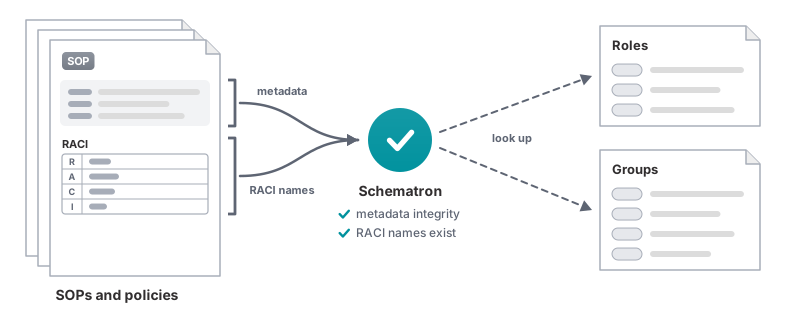
Metadata is only useful if you can trust it, so we added validation. We used Schematron, a rule language for checking XML content. It lets you create custom validation rules for complex structures, including relationships across documents, and control the messages that authors see when a rule fails. For more on what Schematron can do for technical writers, see Schematron Checks to help Technical Writing.
- The table of roles, each with an abbreviation and a description
- The table of groups, also with an abbreviation and a description
Setting up policies and SOP templates
Based on this metadata, we created reusable templates for procedures and policies. A standard operating procedure (SOP) is a repeatable set of steps for carrying out a process. Each of our procedures is a DITA task topic with a responsibility table (the RACI table described above), prerequisites, steps, and a result. The policies are standard DITA topics with a minimum structure: scope, rationale, sections, and the simpler two-role responsibility table.
Writing the policies with AI
Once the templates contained sample metadata, we used AI to help write the full set of policies. The approach was simple: our CTO took each control already in place, found the matching policy stub, and described the current implementation in the Oxygen AI Positron side view. It produced a first policy draft that we could review. Writing a policy turned from a blank-page exercise into reviewing a draft.
For the stubs not covered by existing controls, we assessed the risks and introduced new controls and policies.
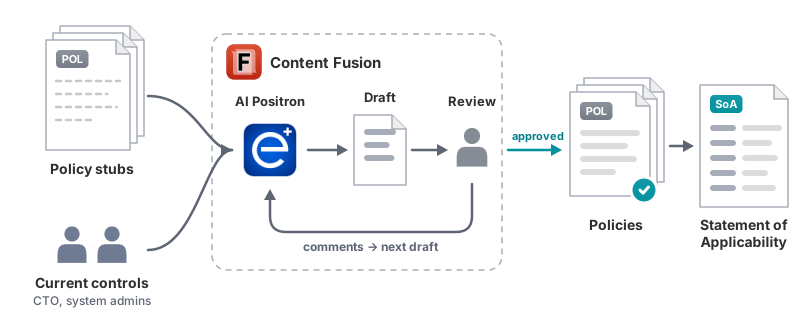
All controls were listed in the Statement of Applicability, with links to the policies.
Collaborative review
No document is approved without a review. That is how we keep the information accurate.
We run the Content Fusion CMS Enterprise server locally, so we used it for this. Content Fusion is a lightweight, Git-based DITA content management system (CMS). It made it easy to connect our existing wiki repository to a project and share it with the whole organization. Role-based access let us designate a few colleagues as authors, able to edit and create review tasks, while others could collaborate only in review tasks.
One useful Content Fusion feature is concurrent editing: several collaborators can work on the same document at once. They can edit with change tracking and add comments at the same time. Nobody has to wait for someone else to finish.
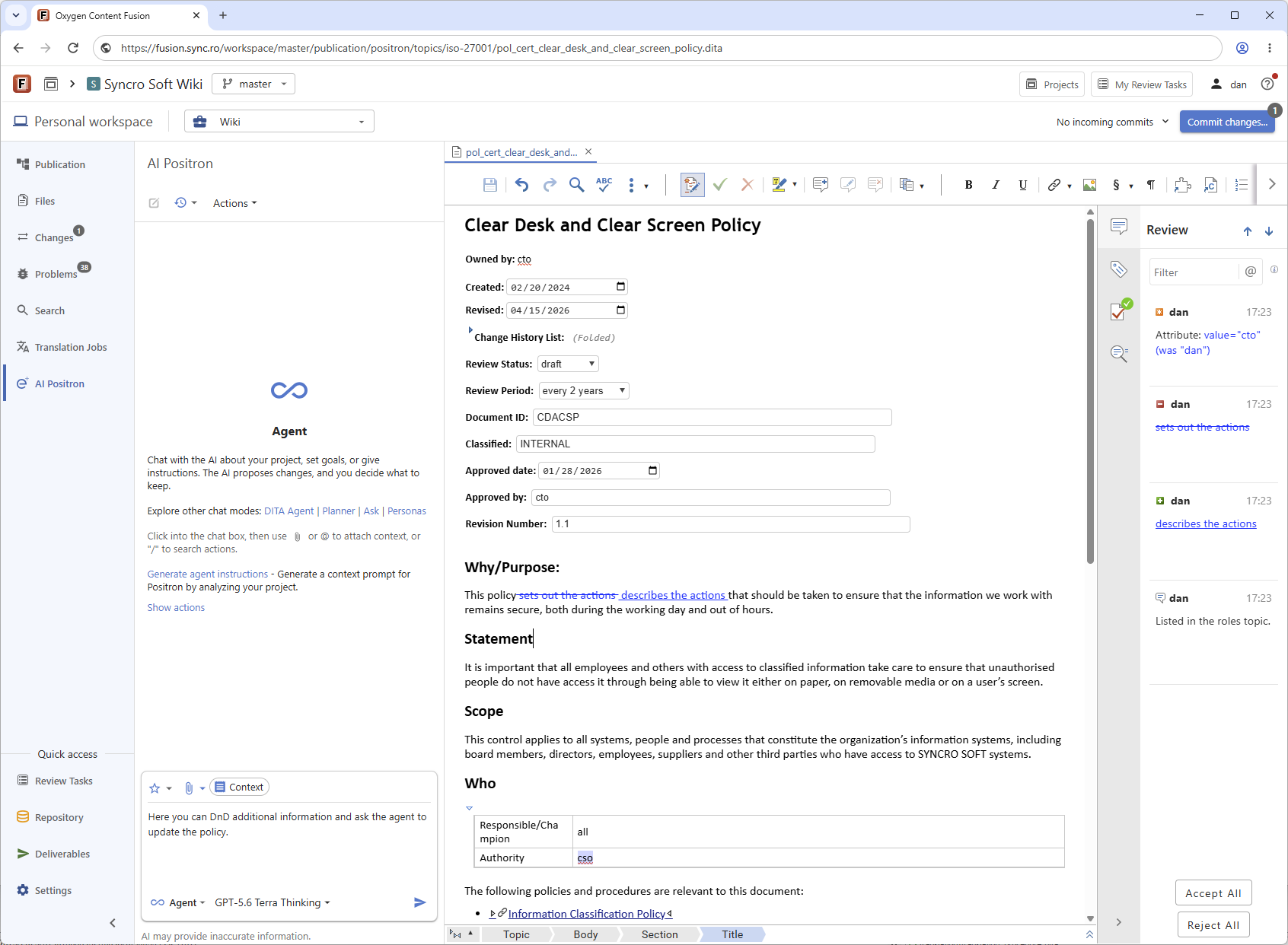
When a review is complete, the author can incorporate the suggested changes and create a new approved version. AI can also help smooth out the wording or bring together information from the comments.
SOPs are living documents that trigger events
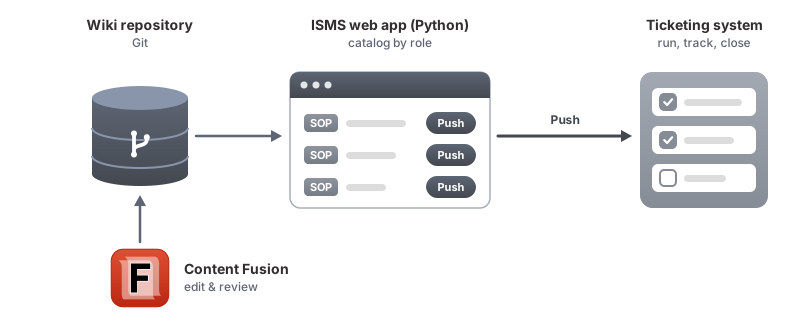
In our company, we use the Atlassian Jira ticketing system. We needed execution tracking and an audit trail for the procedures that support our ISMS policies, so we used Jira to manage them. The SOPs are authored once in the Content Fusion wiki project, then sent to Jira as work items that people can carry out and close.
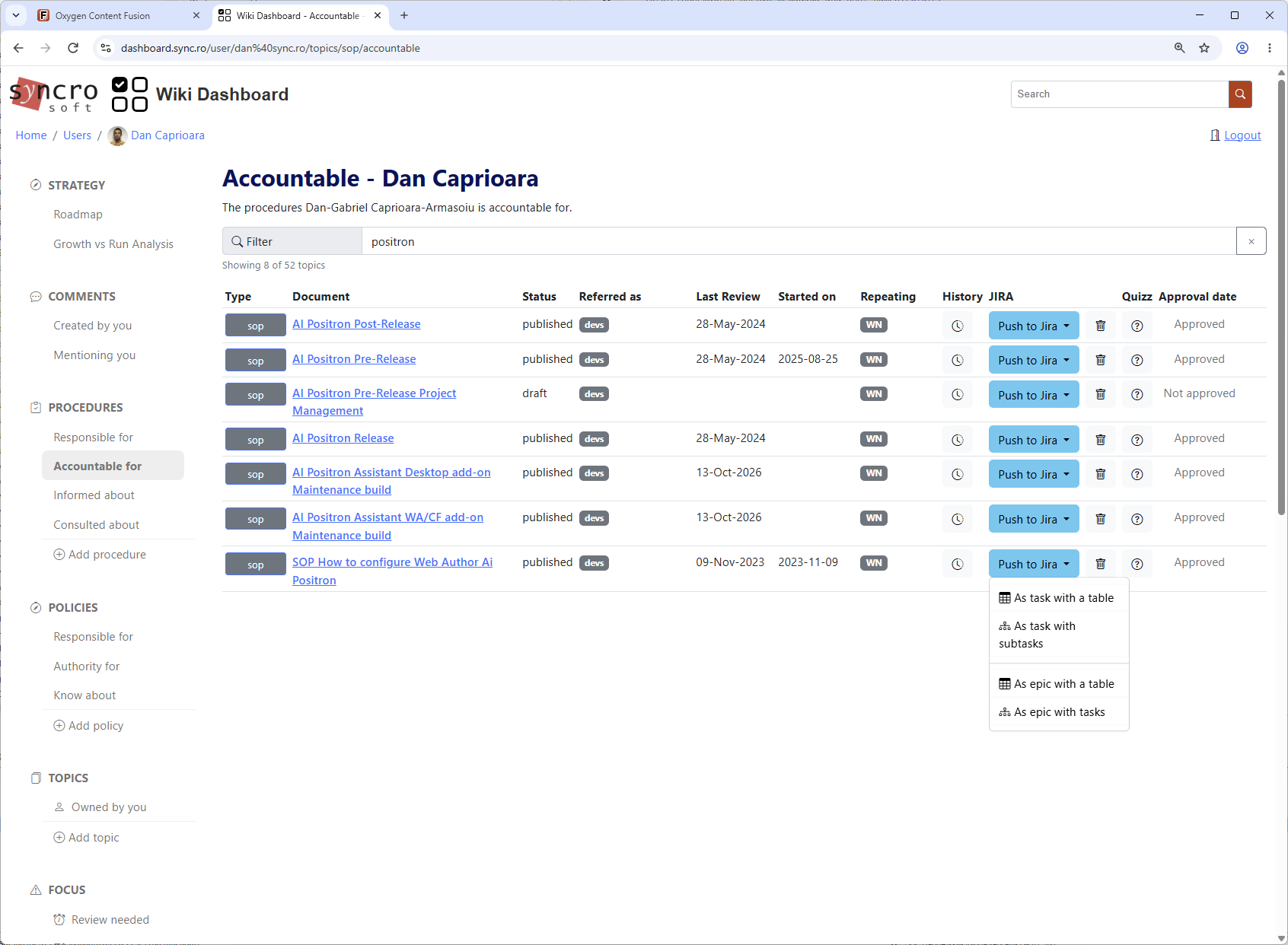
We built a Python web application that lets us push an SOP to the ticketing system. It shows each person a catalog of procedures and policies that match their role, with search and workflow-specific actions. For example, each SOP has a Push button. The application also has a calendar of documents due for review and a history view, so we can compare versions of the same document.
This is a detail of the interface:
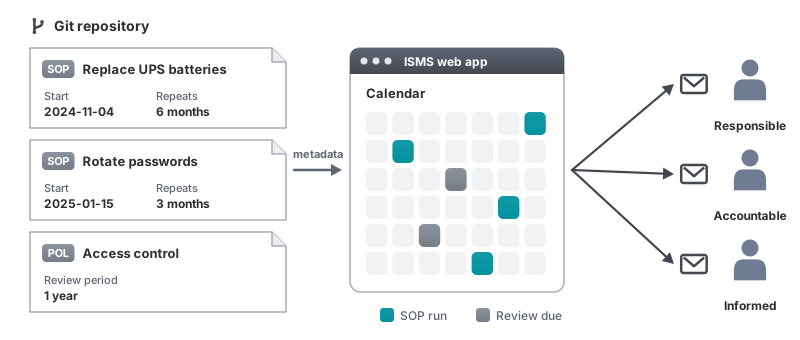
The hardest part of an ISMS is not writing the procedures; it is remembering to run them, year after year. Some procedures, such as changing passwords on some systems or replacing UPS batteries, need more than instructions. Such procedures also need a calendar event, or they are easy to forget. We decided it was simpler to keep the calendar in the application. Everyone named in an SOP's RACI table receives an email when it is time to run that SOP or review a document. The documentation now drives the schedule: we update the metadata and the system responds, without synchronizing separate calendars.
Publishing
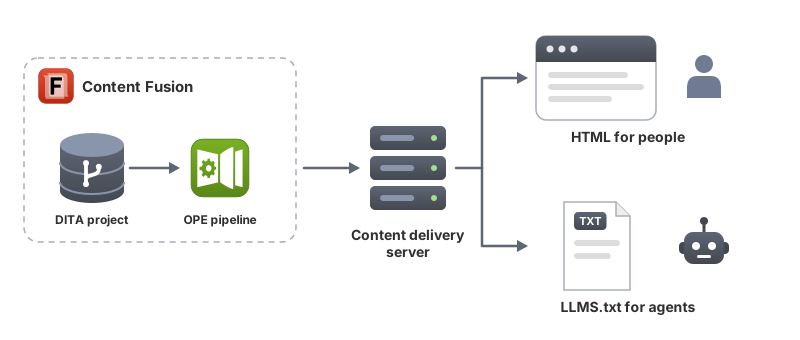
We use Oxygen Publishing Engine, a command-line tool running on our continuous-integration server, to generate and republish the HTML documentation to our internal portal whenever content changes. This publishing infrastructure is also available in Content Fusion. You can also generate an LLMS.txt file set: a structured set of instructions that an AI agent can use as a reference when it carries out an action.
To collect feedback outside the review workflow after publishing, we added Oxygen Feedback commenting to each page.
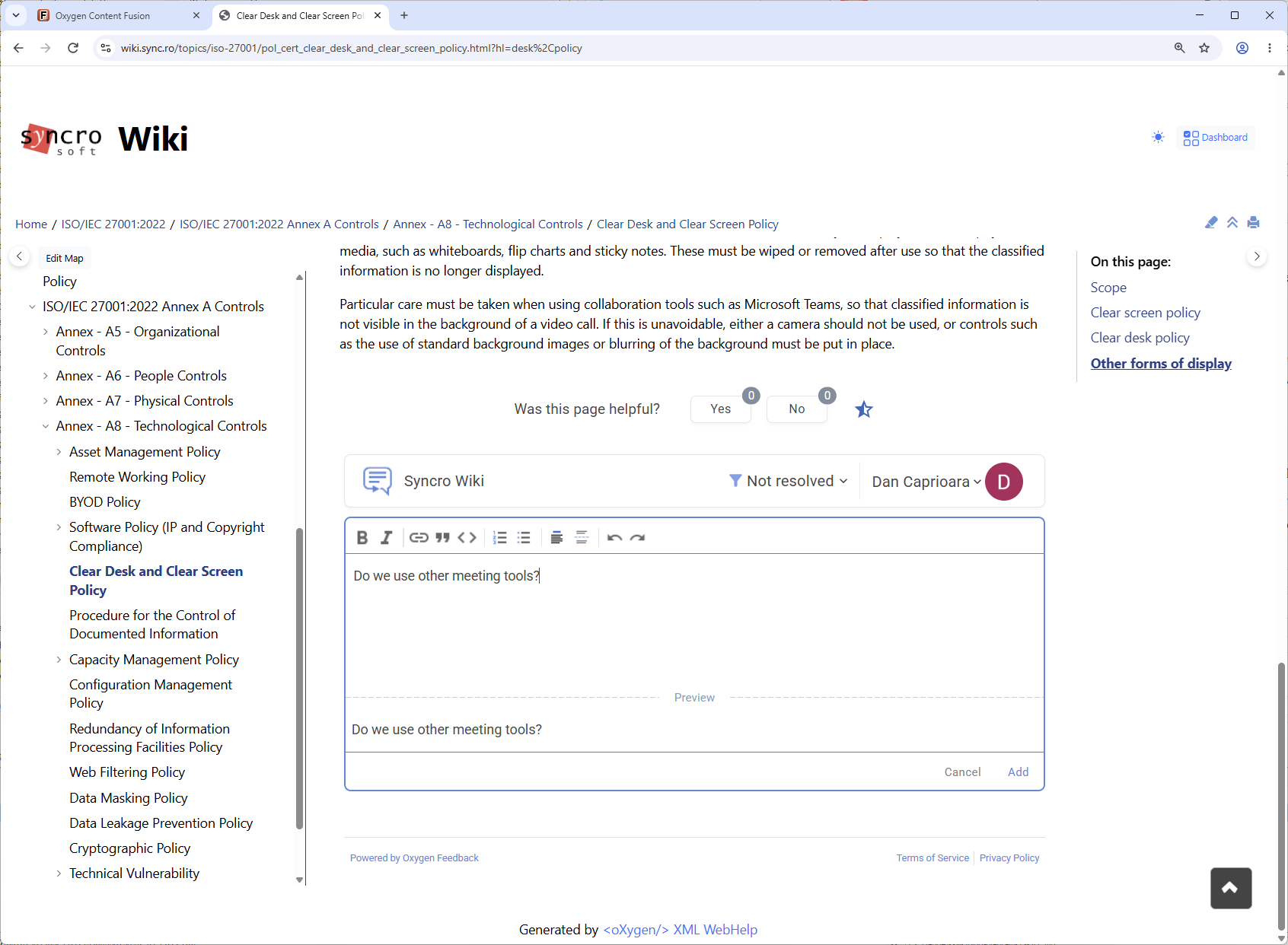
You can also add an edit link to each page so readers can propose a source change. The link opens the matching document in Content Fusion, where they can make the change in a personal workspace and create a review task. The document owner can then review and merge it into the main branch. For how to set it up and what the workflow looks like, see Propose Changes with Oxygen Content Fusion.
Conclusion
Treating our ISMS as a documentation project paid off. The tools we already used for technical documentation (structured topics, Git, validation, collaborative review, and automated publishing) now keep our ISO 27001 policies accurate, reviewed on time, and ready for the next audit. We use the same approach for other company documents that need an owner, regular reviews, and approval.
Want to try it yourself? Starting with version 29, Oxygen includes a new project template for governance projects, based on the ideas presented in this blog post.
Thank you for reading, and happy documenting! Please comment below if you would like more information.